
Turn PDFs, bank statements and invoices into Google Sheets rows you can trace
Turn invoices, contracts, tax documents, and PDFs into structured rows without manual data entry. Trace every value back to the source document.
50 free pages every month · no card required
Listed on



Traceable by design.
Every extracted value links back to its source document. Open the original file from the extracted cell and verify the source behind each number.
Source-Level Audit Trail
Every extracted value keeps a source reference, so you can open the original document and verify where the data came from.
Results in seconds
Skip the manual retyping. Sheetminer extracts values from PDFs and images in seconds, turning hours of data entry into minutes of review.
Cloud Native
Built for Google Sheets and Drive, so extraction, review, and source lookup fit the spreadsheet workflow your team already uses.
Extract, Snip, and Inspect sources all inside Google Sheets.
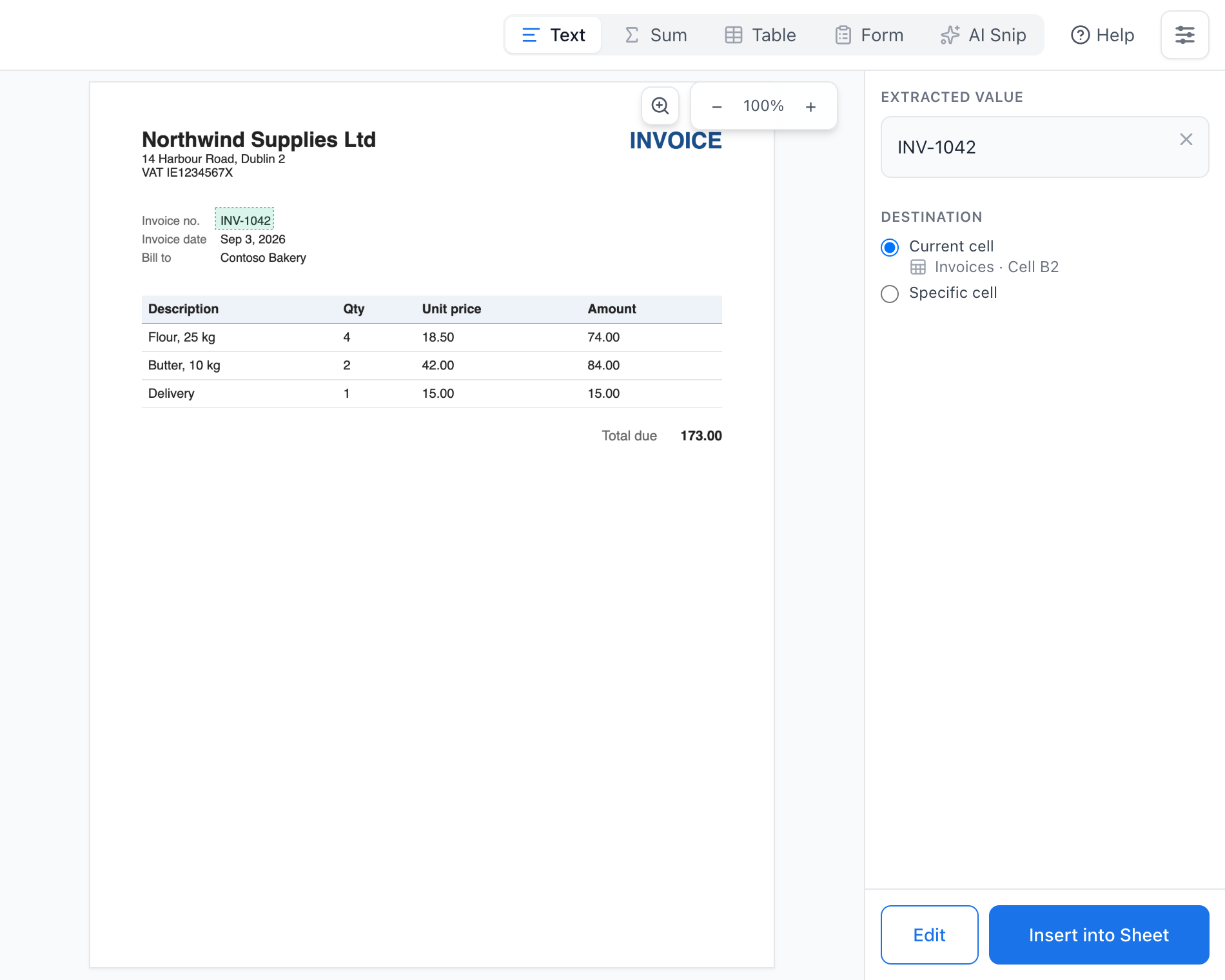
Tick a document in the sidebar and click Extract. On the Text tab, drag a box over the text you want. It appears under Extracted value, where you can correct it. Then click Insert into Sheet.
Draw a box around any value and drop it straight into a cell - with a link back to the source.
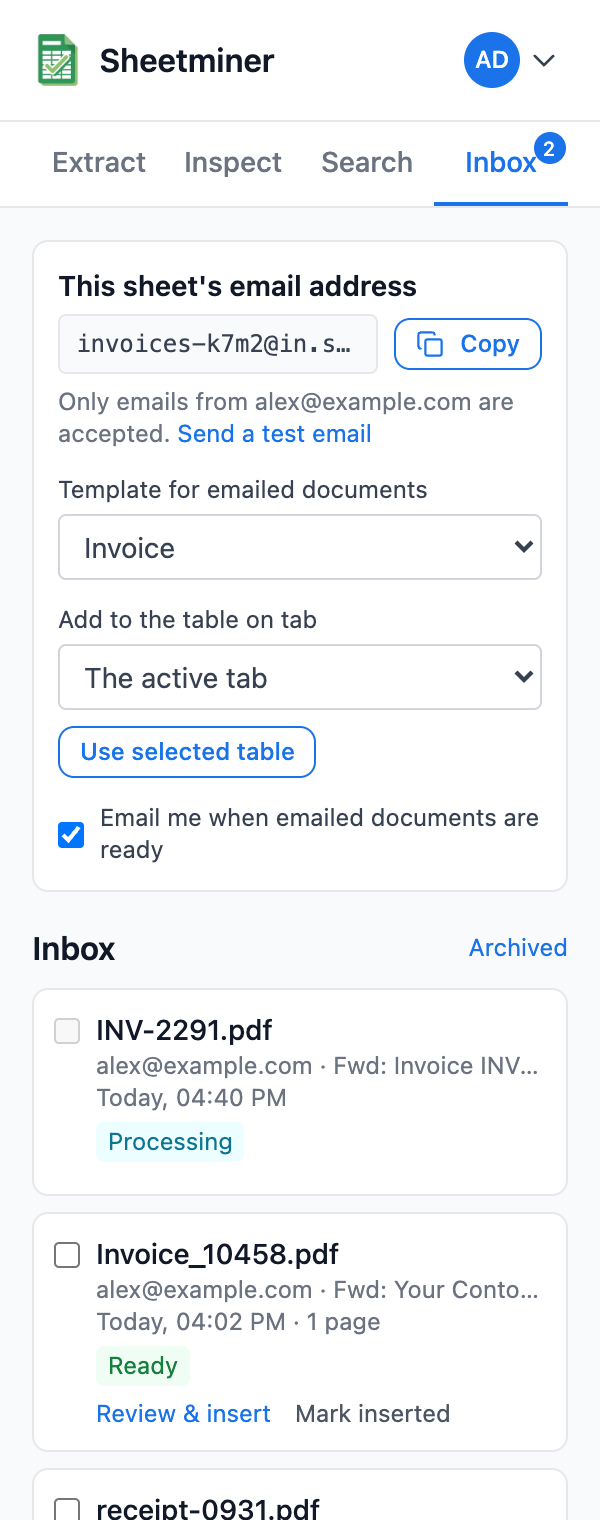
Email documents straight to your sheet.
Every spreadsheet gets its own email address. Forward invoices and receipts to it, and Sheetminer processes them and fills in your table, with every value still linked to its source.
- forward_to_inbox Forward invoices and receipts from your own email, by hand or with a Gmail filter. Only email from your Sheetminer account is accepted.
- auto_awesome Pick an AI Snip or Form Snip template, and every emailed document is read with it.
- table Review the results in the Inbox, then insert them into your table with one click.
Built for common document workflows
Extraction for Finance, Tax, HR, and Legal teams working in Google Sheets.
What people say after their first month close.
A great app which makes the expenses process at work an absolute breeze. I highly recommend for making some of the most tedious tasks short and sweet.
I really liked this! It really helped with my month end close process!
Transparent, usage-based pricing
Start free with 50 pages every month. Paid plans multiply your allowance.
Free
Perfect for trying out Sheetminer
$0
- 50 pages every month
- Every extraction tool included
- Email in up to 10 documents a month
- No credit card required
Go
For sole traders and side businesses
$6.67/month
$80 billed annually · save 17%
Everything in Free, plus:
- Process up to 150 pages a month
- 3x the free allowance — 1,800 pages a year, use them anytime
- Email in unlimited documents
- Upgrade, downgrade or cancel anytime
Plus
For freelancers and small teams
$16.67/month
$200 billed annually · save 17%
Everything in Go, plus:
- Process up to 500 pages a month
- 10x the free allowance — 6,000 pages a year, use them anytime
- Email in unlimited documents
- Standard support
Pro
For growing businesses and accounting firms
$45.83/month
$550 billed annually · save 17%
Everything in Plus, plus:
- Process up to 1,500 pages a month
- 30x the free allowance — 18,000 pages a year, use them anytime
- 8% lower cost per page than Plus
- Email in unlimited documents
- Priority support
Need a few more pages?
Buy a one-time pack of extra pages on any plan, including Free. Extra pages are used after your plan's pages run out, and last a year.
Every plan includes
- Google Sheets add-on
- PDF and image documents
- AI-powered table extraction
- Invoices, receipts, bank statements & 30+ document types
- All precision tools — Sum snip, Table snip, Inspect & more
Each page you upload counts once, and AI Snip on it is included. A very large AI Snip run can use extra pages, based on the AI work it takes. Your allowance resets at the start of each billing period: monthly plans every month, yearly plans get the full year's pages up front. Unused pages don't roll over.
Stop retyping data. Extract values from documents in seconds directly into your spreadsheet.
Stop retyping data.
Extract values from documents in seconds directly into your spreadsheet - with a link back to every source.
Install for free